Tube-Tech ME 1B Mid-Range Equalizer

The real battle for getting a clear and vibrant mix is often fought in the midrange frequencies. The Tube-Tech ME 1B is a tube-driven passive equalizer that addresses the midrange - and only the midrange. So gear up, soldier and go, go, go!

The ME 1B is Tube-Tech's unique take on the classic Pultec MEQ-5 midrange equalizer. There's a lot of mojo going on in the Pultec designs, but the biggest mojo of it is that it is so well-designed that almost whatever setting you use, it will sound good.

Just like the Tube-Tech PE 1C "Pultec" Equalizer, the Tube-Tech ME 1B is a passive, tube-based equalizer. I was designed to accompany the PE 1C equalizer, and provide control over the frequencies that the PE 1C cannot adjust. On its own it's a great tool to shape the midrange of any audio material, and together with the PE 1C it becomes a versatile and full featured equalizer.

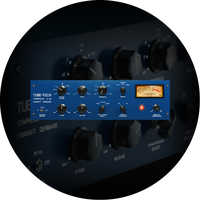
The user interface of the ME 1B is pretty straightforward. You have three different sections, the Low Frequency Peak, Mid Frequency Dip and the High Frequency Peak. The only confusing thing is that the mid section never boosts, but always attenuates the selected frequency. The other two sections, low and high frequency, always boost the frequencies. But as soon as you start to use the ME 1B in conjunction with the Tube-Tech PE 1C "Pultec" Equalizer you'll find that these equalizers complement each other perfectly.

In Short
- Pultec style mid-range equalizer
- Classic Tube-Tech sound, created together with the designers at Tube-Tech.
- Each and every component carefully modeled.
- Perfect companion to the Tube-Tech PE 1C
- Modeled output transformer.
- Extremely analog behavior of frequencies, phase, distortion, etc.
- CPU friendly.

Read more about Tube-Tech.

ALL VISUAL AND AURAL REFERENCES TO THE TUBE-TECH AND PE 1C TRADEMARKS ARE BEING MADE WITH WRITTEN PERMISSION FROM LYDKRAFT. ALL OTHER TRADEMARKS ARE PROPERTIES OF THEIR RESPECTIVE OWNERS AND ARE USED FOR INFORMATION PURPOSES ONLY.

Tube-Tech ME 1B Sound Examples

Tube-Tech ME 1B Sound Examples

Tube-Tech Classic Channel Sound Examples

These sound examples were all made with factory presets in the Classic Channel. The name of the clip is the name of the preset.

Tube-Tech Classic Channel Sound ExamplesThese sound examples were all made with factory presets in the Classic Channel. The name of the clip is the name of the preset.
Low End Trick
Tube-Tech ME 1B Overview

Nothing is as important for the mix as the mid-range.

Jesper Bo Nielsen, Tube-Tech

1. Deposit demo to iLok account:

iLok.com User ID: *
E-Mail Address: *

2. Download the installer

Find the latest installers on the Download page.

3. Transfer the license to your iLok

Make sure that you have the latest iLok drivers installed!

Use this form the generate a 20-day demo license for the selected product. An iLok (What is an iLok?) USB dongle is required to get a demo license.

Licenses will usually be generated instantly and deposited in your iLok.com account, but will sometimes take up to 1 working day. You must enter a valid iLok.com User ID in this field, since the licenses you are ordering will be sent to this account. Your iLok.com User ID is the name you use to log into www.ilok.com, not the serial number printed on your iLok.